24-70mm Lenses: Everything You Need to Know

The post 24-70mm Lenses: Everything You Need to Know appeared first on Digital Photography School. It was authored by Anabel DFlux.

The ultimate guide to 24-70mm lenses

Q. Do you still use a dSLR 24-70 or have you upgraded to a more modern mirrorless mount equivalent?

Why do photographers everywhere seem to be obsessed with 24-70mm lenses? Whether you’re just starting out or you’ve been shooting for a while, you’ve likely encountered the 24-70mm lens, and it’s important that you understand just what makes this lens so popular – and why you might want to consider investing in one.

Below, I walk you through what makes the 24-70mm lens so special. You’ll learn about why it’s such a great choice for all kinds of photography, its technical aspects, and some handy tips for making the most out of it. I also share plenty of 24-70mm photo examples, so you know what to expect after buying.

Let’s get started.

What is a 24-70mm lens?

24-70mm lens photography

You might have heard photographers raving about the 24-70mm lens – and for good reason. Let’s dig into what exactly this lens is.

A 24-70mm lens isn’t exactly a wide-angle lens, nor is it a telephoto lens. It’s what’s often called a standard zoom or a wide-to-telephoto zoom. Why? Because it starts at a wide-angle focal length of 24mm and goes all the way up to a short-telephoto focal length of 70mm. It’s a lens that covers a lot of ground in one package.

If you’re using an APS-C camera, things change a bit. A 24-70mm lens on an APS-C camera offers an effective focal length of roughly 35-105mm. In other words, it tones down the wide-angle perspective and gives you a bit more reach on the long end.

The 24-70mm zoom is incredibly popular. In fact, I would say it’s one of the most common, if not the most common, zoom lenses used by enthusiasts and professionals. It’s a go-to lens for many because of its amazing versatility, impressive optics, and great design.

And it’s not just one or two manufacturers making these lenses. All the big names in the lens world offer 24-70mm glass, which tells you something about its importance in photography.

Common subjects for 24-70mm photography

24-70mm lens photography

The 24-70mm lens is highly versatile, so it’s used to photograph in a wide variety of scenarios. Here are a few genres where this lens really shines:

Portrait photography: The 24-70mm lens can capture stunning wide-angle portraits as well as full-body poses and tight headshots. It’ll also prevent you from needing to change lenses while shooting. Imagine the flow and the connection you can maintain with your subject without pausing to swap glass.

Wedding and event photography: The 24-70mm focal length range allows for both wider and tighter compositions so you can capture the grandeur of a wedding ceremony at 24mm and then zoom in for intimate shots of the bride and groom at 70mm. Planning to photograph indoor or nighttime events? The f/2.8 version of this lens ensures quality images in challenging lighting conditions.

Landscape photography: While the 24mm end doesn’t offer the ultra-wide perspective loved by many landscape shooters, it still provides a reasonably wide field of view. Imagine a breathtaking mountain range or a vast desert; you can capture the entire expanse at 24mm and then zoom in to 50mm or 70mm for more intimate compositions.

Still-life photography: 24-70mm lenses can also come in handy when photographing food, products, and other still-life subjects; as I explore in greater detail below, these lenses tend to offer surprisingly solid close-focusing capabilities. Plus, the optics are impressively sharp – always a benefit when doing close-up photography!

24-70mm lens photography

Bottom line: A 24-70mm lens won’t limit you to specific types of photography, and it’s like having several lenses in one. Whether you’re capturing faces, events, or nature’s beauty, this lens will adapt to your needs and provide endless creative possibilities.

24-70mm f/2.8 vs 24-70mm f/4 lenses

24-70mm lens photography

If you’re considering your first 24-70mm lens, you might be confused by the number of options out there. Maybe you’re struggling to decide which version to buy. Let me help clear things up for you.

The 24-70mm lens is generally offered in two variations: f/2.8 and f/4. This number refers to the maximum aperture offered by the lens: the f/2.8 version is able to use a wider f/2.8 aperture, whereas the f/4 version can only widen the aperture to f/4. As a result, the f/2.8 version can take in more light compared to the f/4 version.

The optical difference between 24-70mm f/2.8 and f/4 lenses might not seem massive. For some photographers, it isn’t. But it can matter significantly in a few specific scenarios. And when choosing between an f/2.8 and f/4 lens, there are some additional consequences that you’ll want to consider.

First of all, because the f/2.8 version can gather more light, it allows for better handheld images in darker scenarios. Thanks to the light boost, you won’t need to drop your shutter speed or raise your ISO, and this means you can capture images that are sharper and less noisy. (It’s the reason why many wedding and event photographers only work with a 24-70mm f/2.8.)

Second, wider apertures produce a shallower depth of field effect, so the f/2.8 version allows for more intense background bokeh. This is especially important in portrait photography. If you’re serious about portraits, I recommend purchasing the 24-70mm f/2.8 over the 24-70mm f/4. Can you still produce nice background blur with an f/4 lens? Yes, but it’ll be a lot harder to do, and often won’t look quite as good.

On the other hand, these wide-aperture zooms do tend to be heftier than their narrow-aperture counterparts. And they are far, far pricier.

Therefore, unless you specifically need an f/2.8 version of the 24-70mm lens for handheld low-light shooting or background bokeh effects, it’s a good idea to go for the f/4 version. It’ll get you the same results – at half the price, and with half the heft.

24-70mm lens photography
24-70mm f/2.8 lenses tend to be larger and heavier than 24-70mm f/4 lenses.

Making the right choice between these two versions requires you to know what you’re after. Consider your shooting style, subjects, and budget. Both options have their merits, and understanding them will guide you toward the perfect 24-70mm lens for your photography needs.

Reasons you should use a 24-70mm lens

Not yet sold on a 24-70mm lens? No problem! Here are a few reasons why I love my 24-70mm glass:

1. There is no learning curve

24-70mm lens woman in a tree

The focal length of a 24-70mm lens stretches from wide-angle to short telephoto – but the bulk of its range sits in the standard focal length spot, which corresponds closely to the human eye. Therefore, to use a 24-70mm lens, you don’t need to learn to see differently; instead, looking through a 24-70mm, you’ll get a very natural field of view.

In fact, when you’re photographing as the eye sees, it’s much easier to learn composition. You can spot interesting subjects, bring your camera to your eye, and snap away – whereas ultra-wide lenses and telephoto lenses force you to think about the field of view, distortion, compression, and how they change the scene.

Even at 24mm, distortion is limited. So you can do wide-angle photography without worrying about wide-angle effects. And at 70mm, you can zoom in for tighter compositions while still capturing a relatively neutral perspective.

Plus, the 50mm focal length is outstanding for portrait photography: not so long that you lose intimacy, and not so wide that you stretch the subject. Instead, it’s just right.

2. 24-70mm lenses offer close focusing

24-70mm wolf close-up shot

24-70mm lenses are designed for standard-sized subjects, right?

Well, yes…and no.

You see, while these lenses are often created with portrait, landscape, and nature subjects in mind, they also offer impressive close-focusing capabilities. The minimum focusing distance does vary from model to model, but it’s generally around 15 inches (38 centimeters).

In other words, you can use a 24-70mm lens to capture stunning close-up shots – of flowers, leaves, portrait details, and more. What’s especially exciting is how flexible a 24-70mm lens can be; if you’re photographing a portrait subject, you can step back for a nice full-body shot, move in slightly for a head-and-shoulders composition, then move in even closer for a detail photo of your subject’s eyes, ears, or clothing.

Event photographers use this close-focusing flexibility all the time. Zoom out for a shot of the wedding guests, step in for a shot of the centerpieces, zoom out for a shot of the ceiling, step in for a shot of the place settings.

And if you like to shoot landscapes, you can capture sweeping scenics at 24mm, then zoom in to 70mm and get in close for details of rocks, sand patterns, etc.

It’s so convenient, and it’s all thanks to the power of a 24-70mm lens.

3. The focal length range is incredibly versatile

I’ve already touched on this, but it’s arguably the most important benefit of a 24-70mm lens, so it deserves its own section.

You see, with a 24-70mm lens, you can shoot at a slew of different focal lengths, from wide to standard to telephoto, and this range offers limitless possibilities in the face of demanding photoshoots.

First of all, when doing a single photoshoot, you can easily go from a wide angle to a zoom, adjusting quickly as the scene and your subjects change. And you won’t have to switch out your lens at all, which will keep the flow of the photoshoot intact and will prevent you from missing key moments as you switch from one lens to the next.

Plus, the versatility of a 24-70mm lens means that you can work with it and nothing else, even as you go gallivanting across the world for destination shoots and vacations. Imagine heading to a photoshoot with just one lens in your bag. Nice, right?

4. The build is robust and comfortable

24-70mm lens photography

Most 24-70mm lenses are impressively robust, featuring a solid build that’s designed to last. Manufacturers know that these are “walkaround” lenses, so they’ve made sure a 24-70mm can handle anything you might face, from rain and snow to blowing sand and dust.

If you frequently shoot in deserts, near waterfalls, or at the beach, then a 24-70mm lens will be a lifesaver, allowing you to capture all sorts of compositions without worrying about ruining your precious optics. Of course, you should always practice proper lens care; I don’t recommend you drop your lens in the water, let it get soaked, and so on. But as far as lenses go, 24-70mm options tend to be very solid.

(And you’ll need a well-built camera, too; while 24-70mm lenses are amazing, they can’t protect your camera electronics!)

Additionally, 24-70mm lenses feel great in the hands. They’re not so long that you’ll get tired after a few hours, and they’re not so short that you have nothing to grip. You can comfortably use a 24-70mm lens for day-long photoshoots, and you’ll always feel like you’re working with an actual, solid lens.

5. The size and weight are perfect for pretty much everything

On average, 24-70mm lenses measure around 3.3 x 3.3 x 4.9 inches (8.4 x 8.4 x 12.4 centimeters), and they weigh approximately 2 pounds (900 grams).

While these lenses aren’t tiny, they’re certainly not large, nor are they heavy. They fit in pretty much any camera bag you’ll ever encounter, even when they’re attached to a camera – so you can carry your setup in a shoulder-sling bag or a backpack without any trouble. Plus, because 24-70mm lenses are pretty short, you can hang your camera around your neck and you won’t feel like you’re carrying a brick.

In fact, my 50mm (f/1.2) lens weighs more than my 24-70mm lens, even though it’s shorter. And I’ve even managed to put my camera and 24-70mm lens in a regular old purse (which can come in handy in quite a few situations).

Bottom line: A 24-70mm lens is sized for photographic adventures of all types, from treks in the mountains to casual walks around the city to travel photography across the globe.

24-70mm lens man playing cello

Tips for working with a 24-70mm lens

You’ve got your 24-70mm lens and you’re excited to use it. But before you start snapping away, there are some tips and tricks that can help you get the most out of this lens:

1. Practice using the lens at every focal length

dog near a fountain 24-70mm

First off, make sure you understand what each focal length in your lens’s range (24mm to 70mm) can do.

Spend some time experimenting with different focal lengths. See how they affect your compositions.

Try photographing a single subject at 24mm, then at 35mm, then at 50mm, then at 70mm. Pull up the images on your computer and observe them side by side. Ask yourself: How does each focal length change the view of the subject?

Soon, you’ll get to know how each focal length will look – even before you look through the viewfinder. You won’t waste valuable time zooming in and out to find the perfect shot.

2. Watch the distortion

two men in the desert 24-70mm lens photography

When shooting at the wide end of your 24-70mm lens, you may notice some distortion.

This means that straight lines will seem to converge, and objects close to the lens might look a bit stretched or skewed.

Distortion like this – known as perspective distortion – isn’t always bad, and it can be used artistically to great effect. But it’s important to be hyper-aware of its effects because it can result in unflattering photos if you’re not careful.

If you are trying to minimize distortion at 24mm, make sure that your subjects are decently far from the front of the lens, and do your best to keep the lens parallel to the ground (i.e., not angled upward or downward).

3. Don’t rely too heavily on the zoom

24-70mm lens photography

A zoom lens can make it tempting to stand in one spot and just twist the lens barrel to change the composition. But while the zoom on 24-70mm lenses is fantastic and highly useful, but it doesn’t replace the need to move physically closer to your subject.

For one, moving around can help you fine-tune your compositions. And it can also give you a completely different perspective.

So get into the habit of using a mix of movement and focal-length adjustment. That way, you’ll get the best results and discover perspectives you might have otherwise missed.

Remember, photography is as much about the movement and physical positioning of the photographer as it is about the focal length!

4. Turn on that image stabilization

man standing among lights 24-70mm lens photography

Many 24-70mm lenses come with image stabilization. It’s a handy little feature that helps counteract camera shake; that way, you can photograph handheld at slower shutter speeds in the 1/20s-1/60s range, which is especially useful in low-light scenarios such as evening portrait sessions and indoor events.

So whenever you’re photographing a relatively stationary subject and you don’t have access to a tripod (or you simply don’t want to use one), switch on that image stabilization.

That said, there are a couple of caveats to bear in mind. First, if you are using a tripod, make sure that you switch that image stabilization off. Otherwise, you might find that it actually increases the blur in your photos.

And second, be aware that image stabilization generally won’t help you capture sharp photos of moving subjects. For that, you’ll need a fast shutter speed.

5. Watch the background

dog surrounded by flowers 24-70mm lens photography

The 24-70mm lens might not be considered a true wide-angle lens, but it still offers some wide focal lengths, especially in the 24-50mm range. And when shooting wide-angle compositions, you might notice that the background in your shots often turns out relatively sharp, even if you’re using a wide aperture.

What does this mean for you?

It means you need to pay careful attention to what’s happening behind your subject. A distracting background can easily take the focus away from your main subject. Maybe it’s a bright sign in a street scene or a branch sticking out in a nature shot. Whatever it is, you’ll want to make the effort to keep it out of your shots.

If you find yourself in an area where the background might cause some issues, try moving around your subject. Walk to the right or left, get down low, or even climb up high if you can. It’s all about finding the right angle that lets your subject shine without any background interference.

6. Consider using a lens filter for protection

Investing in a good 24-70mm lens can be a significant expense. Such a lens will generally be optically excellent, and you’ll want to take care of it as much as possible.

That’s why I recommend adding a UV filter or a clear filter to the front of your lens. It’ll protect your precious glass from accidental bumps or those unexpected finger smudges.

So if you’re planning to spend a lot of time with your 24-70mm lens, do consider investing in a good-quality lens filter. It’s a simple step that can go a long way in keeping your lens safe and your images looking their best.

24-70mm lens photography: final words

And there you have it! You’ve learned all about the 24-70mm lens and its impressive capabilities, including why it’s so incredibly popular.

You’ve also learned about the different versions available and even picked up some handy tips. Whether you’re capturing the grandeur of landscapes, the intimacy of a wedding, or the expression of a portrait, this lens offers the flexibility you need.

Investing in a 24-70mm lens might just be the step that takes your photography to the next level. The world through a 24-70mm lens is rich and varied, and it’s waiting for you to explore!

Now over to you:

Do you think you’ll buy a 24-70mm lens? What do you plan to use it for? Share your thoughts in the comments below!

The post 24-70mm Lenses: Everything You Need to Know appeared first on Digital Photography School. It was authored by Anabel DFlux.
15 Best Photo-Editing Apps in 2024 (+ Buying Guide)

The post 15 Best Photo-Editing Apps in 2024 (+ Buying Guide) appeared first on Digital Photography School. It was authored by Ana Mireles.

The top apps for editing your photos

Photo editing is one of the most effective ways to give your photos a refined, professional look, but desktop editors can be frustratingly inconvenient for photographers (and expensive, too!).

Fortunately, smartphones and tablets now offer access to an impressive range of outstanding editing apps. Many of these tools are powerful, easy for beginners to grasp, and free to download. The best photo-editing apps are wildly convenient, too; you can use them to dramatically improve your shots while riding the bus, flying on a plane, or lounging in front of the couch.

The sheer number of options can be overwhelming, however – and that’s where we come in. Below, introduce you to our 15 favorite editing apps, including options for beginners, advanced users, and everyone in between. We also break down the process of choosing the perfect app for your photo-editing needs.

Ready to enhance your photos with a top-notch editing app? Let’s dive right in!

The best photo-editing apps for general editing

In this section, you’ll discover the best photo-editing apps for general adjustments. With the apps on this list, you can adjust exposure, enhance colors, crop, sharpen, and more.

1. Snapseed

best photo editing apps snapseed
  • Our Award: Best free photo-editing app
  • Cost: Free
  • Availability: iOS and Android

Snapseed is one of the most popular photo-editing apps on the market – and for good reason. It’s very intuitive and easy to use, which makes it perfect for beginners. At the same time, Snapseed offers a lot of control for more skilled users thanks to features such as selective editing, curves, perspective correction, and much more.

You don’t need to pay any fees for using Snapseed, nor are there in-app upgrades; it’s completely free. So if you’re after a beginner-friendly photo editor that can do pretty much anything, Snapseed is a great choice.

2. Lightroom

best photo editing apps lightroom
  • Our award: Best paid photo-editing app
  • Cost: Free limited version; paid version requires an Adobe subscription ($9.99)
  • Availability: iOS and Android

Most photographers have heard of Adobe Lightroom, one of the most popular editing programs in the world. But Adobe also offers Lightroom Mobile, which is a mostly full-featured mobile version of the powerful desktop editor – and as you might expect, it packs quite a punch.

You don’t need to pay to download the app, and the limited free version does allow you to do most basic editing tasks, so if you’re just looking for a basic editor, you may never want – or need – to upgrade.

For more folks hoping to really dive into photo editing, however, we do recommend upgrading to a paid plan. There are several options, all of which offer access to the Lightroom Mobile app, one or more Adobe desktop apps – such as Lightroom or Photoshop – and cloud storage so you can seamlessly edit on several devices.

The paid plan offers a wide variety of additional features, including a healing brush, selective adjustments, geometry tools, batch editing, RAW editing, and perspective corrections. (Note: If you want to use Lightroom Mobile to speed up your workflow, check out this article.)

3. Photoshop Express

Photoshop Express
  • Our Award: Best editing app for beginners
  • Cost: Free
  • Availability: iOS and Android

Adobe Photoshop is the industry standard for photo editing. Its mobile version is divided into three smaller and specialized apps; the basic editor is Photoshop Express.

Photoshop Express offers one-touch solutions such as an auto-fix option and filters. It also allows you to edit and retouch with total control. And it’s packed with many fun features such as stickers and collages.

You can crop to most platforms’ formats and share directly from the app. While you don’t need an Adobe subscription to use Photoshop Express, you will need a free account.

4. Pixlr

Pixlr
  • Our Award: Best advanced editing app
  • Cost: Limited version for free
  • Availability: iOS and Android

Pixlr is a well-rounded editing app, offering all the post-processing essentials plus tons of presets and features to unleash your creativity.

There’s no need to create an account and you can download Pixlr for free, though you’ll be offered in-app purchases for overlays and stickers.

Pixlr also offers two great browser versions that you can use for free – or you can get a subscription for full access to both browser versions and other useful assets.

Best photo-editing apps for fun and filters

In this section, I’ll share the best photo-editing apps for filters and effects.

(In most cases, these apps also include a camera and some basic adjustment tools.)

5. VSCO

best photo filter apps vsco
  • Our Award: Best filter app
  • Cost: Free limited version; $19.99/year for the full version
  • Availability: iOS and Android

VSCO works as a general photo editor, but it belongs in the fun and filter category thanks to its artsy, social-media-focused features.

To use VSCO, you will need to create a (free) account. After that, you can continue to use VSCO for free, but most of the filters are sold separately.

Alternatively, you can grab a yearly subscription for $19.99 that includes 200 filters (and you have a 7-day trial to make sure it’s worth it).

Your creations can then be shared with the community, which is like- and comments-free. In other words, the VSCO community is more about the quality of the work. You can also share VSCO creations directly from the app to other social networks such as Instagram or Snapchat.

6. Prisma Photo Editor

best photo filter apps prisma
  • Our Award: Best artistic editing app
  • Cost: Free limited version or free 3-day trial. Full version is $29.99/year.
  • Availability: iOS and Android

Prisma is designed for art lovers. It’s more than just filters; Prisma uses artificial intelligence to turn your photos into artworks inspired by the greatest artists in history. And unlike other apps, Prisma adds new filters every day.

General editing is also possible (as it is with most filter apps). Though I do miss the rotation tool to correct the horizon if needed.

7. PicsArt Photo Editor

best photo filter apps picsart
  • Our Award: Best all-around editing app
  • Cost: 7-day free trial, then $34.99/year.
  • Availability: iOS and Android

PicsArt Photo Editor is one of the most versatile editing apps on the market. You have a powerful in-app camera, plus tools and presets to no end. You can do anything with PicsArt, from professional applications like time-lapse photography to fun stickers and drawings.

PicsArt Photo Editor also has social media integration, as well as thematic contests that will spark your creativity.

8. A Color Story

a color story
  • Our Award: Best app for Instagrammers
  • Cost: Free
  • Availability: iOS and Android

A Color Story is the perfect app to manage your Instagram account. You can do some basic editing and apply filters to your images and videos.

New filter collections based on current trends are added often, although most do need to be purchased separately.

You can even plan your Instagram feed with the Grid feature. In fact, you can use this just to see how the feed looks after each picture you add, or you can connect it to your Instagram account for scheduling posts. That’s why A Color Story is great for maintaining a unified Instagram feed – whether you are a photographer, influencer, or community manager.

9. Afterlight Photo Editor

afterlight
  • Our Award: Best app for digital imaging
  • Cost: Free
  • Availability: iOS and Android

Afterlight boasts 59 filters, 66 textures, and 77 frames for you to transform your images in a single click. Some of these tools are offered for a small fee, but there is also a wide variety of free, high-quality effects to choose from.

Afterlight can also handle basic editing tasks; the app has 15 tools to make most of the adjustments you’ll need.

The Crop tool is also quite versatile; it allows you to straighten, flip, and crop freehand and to many standard ratios.

10. Photo Lab Picture Editor

photolab
  • Our Award: Best editing effects app
  • Cost: 3-day free trial, then $9.99/year or $4.99/month.
  • Availability: iOS and Android

Photo Lab is full of filters and effects; you can have fun or do some professional-looking work. You can even turn your photos into cartoons, and you can swap faces and make collages.

Photo Lab is an app designed to give free rein to your creativity. It’s also a social app with a big community of followers that’ll help you stay inspired.

Best apps for specialized editing

If you’re looking for the best photo-editing apps with dedicated features, this is the list for you:

11. Foodie

foodie
  • Our Award: Best editing app for food photographers
  • Cost: Free
  • Availability: iOS and Android

Although it has all the standard photo-editing tools, Foodie is designed primarily for food photography.

You can use Foodie’s in-app camera to take pictures (and you’ll get a live view of your selected filter). There are plenty of food filter series, including Fresh, BBQ, Yum, and more.

Once you’ve chosen a filter, you can compose your image using the smart grid. For flat lays, you’ll get a yellow band across the edges of the screen when the camera is perfectly level.

Foodie is only missing one key editing feature, but it’s a big one: a crop tool. You’ll either need to compose well from the beginning or have another photo editor on hand to deal with any cropping.

12. SKRWT

skrwt
  • Our Award: Best app for perspective correction
  • Cost: $1.99
  • Availability: iOS and Android

If you like photographing architecture, real estate, or urban scenes, then you’re going to love SKRWT.

It’s a dedicated distortion-correction app, plus it has a powerful auto-cropping feature to ensure you get the best results.

And it corrects lens distortion regardless of whether the image was taken with an interchangeable lens camera, a GoPro, or your smartphone.

13. TouchRetouch

touchretouch
  • Our Award: Best app for removing objects
  • Cost: $2
  • Availability: iOS and Android

Removing unwanted objects from a photo is something we all have to deal with, no matter the genre of photography.

With TouchRetouch, you can use brush and lasso tools to select an object for removal. And if you’re removing a line (e.g., telephone wires in the background), you just need to tap; it will automatically be selected and removed.

TouchRetouch also has a clone tool, plus a feature called Quick Fix to remove blemishes. Many apps offer some kind of healing brush, but as a specialized app, TouchRetouch will get you the best results.

14. Motionleap

pixaloop
  • Our Award: Best cinemagraph app
  • Cost: Free limited version, or one of three paid choices: $3.50/month, $18/year, or a one-time purchase of $55.
  • Availability: iOS and Android

Have you seen pictures where everything is motionless – except for the water running or the coffee steam coming out of a cup? They’re called cinemagraphs, and Motionleap lets you create that effect with just a few taps and swipes.

You can also add filters, do some basic adjustments, and apply overlays. Keep in mind that the free version won’t let you export your projects and you won’t have all the tools available, so it’s worth considering a paid subscription.

15. Canva

best photo editing apps canva
  • Our Award: Best editing app for graphics
  • Cost: Free
  • Availability: iOS and Android

If you use your photography for marketing purposes, then Canva is the app for you. It offers enough graphic design templates to fit your every need.

From creating an eye-catching Facebook post to designing an entire menu, Canva is intuitive and easy to use.

Many templates are free, though others must be purchased separately. Canva also has a browser version so you can access your projects on your computer, too.

How to pick the perfect app for editing photos

The best photo-editing apps

Editing apps can vary a lot in their tools and features, so before you go downloading or purchasing an editor, make sure that it suits your needs. When choosing an app for post-processing, there are five key factors we recommend you consider:

Ease of use and interface

Photography should be fun, right? That goes for editing, too. It’s crucial that the app you choose has a user-friendly and intuitive interface. If you’re a beginner, this is especially important. There are many simple and enjoyable apps out there, but others can be complicated and convoluted.

Therefore, if you’re not tech-savvy or don’t have experience with photo editors, we really recommend you pick a simple app that offers a basic design. Some come with helpful tutorial sections or walkthroughs; these are great for beginners as they’ll help you navigate the app and use the tools effectively.

If you’re an experienced photo editor, a confusing interface might not be such a hindrance, so you may want to focus less on the app interface and more on its advanced features. But remember: Every app is unique. It’s often worth your time to test out different ones.

Fortunately, most of the apps in this list are free. And even the ones that aren’t free do tend to offer trials or demo versions. So go ahead and get your hands on a few. Take them for a spin. See how comfortable they feel before you make a commitment.

Editing features

Every photo editor is different; each comes with its unique set of features, and it’s important to find one that can do what you want it to.

Are you a hobbyist or a beginner? Then you might be looking for an app that provides basic editing features, such as cropping, rotating, adjusting brightness, contrast, and saturation. Don’t forget filters, either, which can be great fun to experiment with (and can dramatically increase your editing speed).

On the flip side, maybe you’re more of an enthusiast or a pro. In that case, you might want more advanced editing features. You’ll want to look for things like layering, text addition, object removal, and masking.

Also, if you’re looking for an easy-to-use app that’ll speed up your workflow, consider an editing app with AI tools. These apps are designed to automate the editing process and can be a lifesaver if you’re dealing with a lot of photos.

One more thing: If your main goal is to accomplish one form of precision editing, consider a specialist editing app. Several of the apps on our list focus on specific types of edits, such as perspective correction or object removal – and while they can only make one adjustment, they do an excellent job.

Key accessories

The core purpose of an editing app is, well, editing. But you shouldn’t forget about the extras. These are the features that go beyond editing but can be useful for photographers and photo editors.

Some editing apps, for instance, come with built-in cameras. You can use these to shoot and edit all in one place.

And then there’s image organization. It’s not the most exciting part of photography, but it’s important. Some apps let you organize your image library with tools such as folders, ratings, and keywords.

Cloud-storage integration can also be a game-changer, especially if you like to edit on multiple devices. This feature ensures that you can do your main editing on your desktop, then switch to your phone or tablet for editing on the go, then to your laptop for editing on the job, and so on.

And last but not least, let’s discuss exporting and sharing. Some apps let you export in certain handy file formats and share directly to social media platforms, which can be a massive time-saver.

So when you’re choosing your editing app, remember to consider these additional features. They might not be essential, but they just make your life a lot easier.

Compatibility and performance

Most of the best apps for photo editing are available for both iOS and Android devices, but a few are tailored for one type of device. It’s critical to pick an app that’s a match for your smartphone or tablet.

Before you get too excited about a specific app, take a good look at the versions available. And even if the app does have Android and iPhone versions available, keep in mind the features can differ across platforms. So if you’re checking out reviews, be sure they’re for the version you’re planning to download.

Lastly, let’s talk about performance. Some apps can be quite demanding, and whether your smartphone or tablet can run it effectively depends on a variety of factors. Checking out the system requirements beforehand will save you from any unexpected crashes and frustration.

Price

Photo-editing apps range from absolutely free to relatively expensive, and their pricing models vary, too. Some can be purchased with a one-time payment. Others require a subscription.

Generally, more expensive apps come with a wider range of features. But don’t think pricier is always better. Some of the apps listed in this article offer top-notch features and cost nothing at all.

Before making a big purchase, ask yourself if you’re really going to use those advanced features. Maybe a free or less expensive app will do just fine. And don’t forget to check for free trials. It’s always a good idea to test out a paid app before committing to it.

The best photo-editing apps: final words

In the end, the ideal photo-editing app should be a perfect fit for you. It should feel comfortable to use and have everything you need to achieve your vision. Above all, it should take your photos to the next level!

So when picking the best app to edit photos, don’t rush. Explore different apps. Take advantage of those free trials. Experiment with various tools. And if you can’t decide, remember that you don’t need to pick just one; you can use two apps, three apps, or more to improve your editing workflow.

Now over to you:

Do you like any other photo-editing apps? Are there apps that should be added to this list? Share your thoughts in the comments below!

The best image-editing apps FAQ

Are paid photo-editing apps better than free photo-editing apps?

The best paid editing apps do sometimes offer more features than the best free editing apps, but there are excellent free choices such as Snapseed and Photoshop Express.

Should I have more than one editing app?

That depends on your needs. In our experience, it is useful to have different apps for different tasks.

What if I like smartphone photography but prefer to edit on my computer?

If you don’t like editing on your phone, you need to use an app that allows you to easily transfer pictures between your phone and your computer. You can use Lightroom for this (with an Adobe subscription). Another choice is to use a cloud service such as Dropbox.

What is the best photo-editing app?

We’re big fans of Snapseed and Lightroom Mobile. That said, there isn’t one app that tops all the others; it’s about which one is best for you. That will depend on your phone, your budget, and your editing needs – plus your personal preference.

The post 15 Best Photo-Editing Apps in 2024 (+ Buying Guide) appeared first on Digital Photography School. It was authored by Ana Mireles.

Hands-on with the Freewell Locking VND/CPL Filter

The post Hands-on with the Freewell Locking VND/CPL Filter appeared first on Digital Photography School. It was authored by Sime.

Here’s our hands-on with the Freewell Locking VND/CPL Filter

(I tested the set on my Sony a7R III + Tamron 16–30mm f/2.8 G2)

If you’re just starting to experiment with filters, you’ve probably already heard about ND filters (Neutral Density) and CPLs (Circular Polarisers). ND filters let you slow your shutter speed for smooth water or motion blur in bright light, while CPLs cut glare and reflections for richer skies and more saturated colour.

The new Freewell Locking 3 to 7 stop VND/CPL combines both in one sleek, clever package — and after taking it for a spin last weekend (in crazy weather!) at the Point Lonsdale Lighthouse, I came away impressed.

Hands-on with the Freewell Locking VND/CPL Filter

A Quick Look at What’s New

For me, after experimenting with a magnetic system for a couple of years, the real standout is how the locking mechanism secures the VND/CPL filter to the adapter ring (Available in 49mm, 52mm, 55mm, 58mm, 67mm, 72mm, 77mm and 82mm) which you screw to the end of your lens, all while leaving the CPL/VND easy to manipulate, but stays securely in place. With your filter clipped into position, you can easily depress the side buttons on the red ring and spin it around to adjust your polarisation position, and there are two little tabs on the black ring that adjust your VND. (It’s good practice to adjust your variable ND first and then your Circular polariser)

Hands-on with the Freewell Locking VND/CPL Filter

I had no issues with bumping the filter tabs and accidentally changing settings, etc. That mix — a positive, confidence-inspiring lock plus a tactile, easy-to-fine-tune control ring — gives you reliable, repeatable results in the field without sacrificing on-the-fly adjustments. — the sort of detail that shows Freewell’s been listening to creators. ??

Hands-on with the Freewell Locking VND/CPL Filter

The hybrid design, meaning you get the VND with a built-in CPL at the same time, That means fewer filters to juggle, less time swapping glass in the field, and no cross-polarisation weirdness. BUT you can stack extra filters, I was sent the ND32 as well as the Snow Mist 1/4 filter. When you stack the ND32 with the VND, you get upto 10 stops of ND (fun long exposures in the middle of the day!)

Small Touches That Make a Difference

One thing that genuinely surprised me was the NFC lens cap. I will admit I thought it was a bit of a gimmick at first, but when you tap your phone to it, and it takes you straight to the Freewell Hub, where you’ll find setup videos, warranty info, and filter guides — Yeah, that’s actually super handy for anyone new to filters! New hunting around for QR codes or small paper manuals – I was about to say “who doesn’t always have their lens cap with them… but I don’t want to jinx myself!) – Nice touch, Freewell!

Hands-on with the Freewell Locking VND/CPL Filter

In Use

Mounted on my Sony a7R III with Tamron’s new 16–30mm f/2.8 G2, the Freewell filter set performed beautifully. Colour rendition stayed natural thanks to Freewell’s True Color optics, with no unwanted tint or cast to my eye — even at higher ND stops. Reflections off the water and rocks at Point Lonsdale were cleanly tamed, and the added contrast in the sky was a nice bonus. I was able to shoot a 10 second exposure at 2:30pm – Quite fun!

While I didn’t get to use the Snow Mist filter on the weekend, I really should have! You can see an example below of what the filter does – pretty much exactly what it says “Snow Mist” that light dispersion is pretty sweet!

Hands-on with the Freewell Locking VND/CPL FilterHands-on with the Freewell Locking VND/CPL Filter
Freewell Snow Mist 1/4 ?

Who It’s For

If you’re just getting into filters, this is a smart, long-term investment. You’ll spend less time worrying about shifting stops and more time focusing on your composition. The combination of ND + CPL, the locking mechanism, and excellent optical clarity make it a standout for both photographers and filmmakers who want reliable, repeatable results.

Freewell’s Locking VND/CPL is available now through FreewellGear.com, Amazon, and selected retailers.

Freewell Provided the filter kit to us for review, we thank them for reaching out!

The post Hands-on with the Freewell Locking VND/CPL Filter appeared first on Digital Photography School. It was authored by Sime.

TAMRON Announces the Class-Leading Compact and Lightweight Telephoto Zoom 70-180mm F/2.8 Di III VC VXD G2

The post TAMRON Announces the Class-Leading Compact and Lightweight Telephoto Zoom 70-180mm F/2.8 Di III VC VXD G2 appeared first on Digital Photography School. It was authored by Sime.

The Tamron Trinity for Nikon Z hits the streets!

Here’s the press release!

TAMRON Announcesthe Class-Leading Compact and Lightweight Telephoto Zoom70-180mm F/2.8 Di III VC VXD G2with Vibration Compensation for the “Nikon Z mount system”
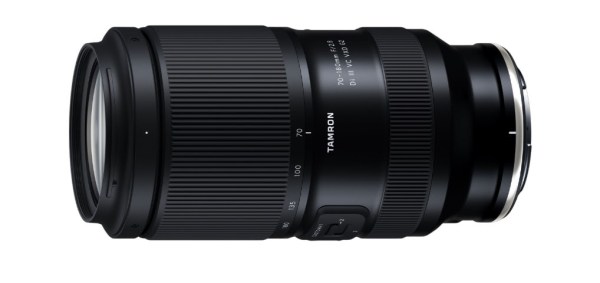
October 7, 2025, Commack, NY – TAMRON announces the launch of the 70-180mm F/2.8 Di III VC VXD G2 (Model A065), a fast-aperture telephoto zoom lens for “Nikon Z mount system” full-frame mirrorless cameras on October 23, 2025. The lens will retail for $1,149 USD / $1,549 CAD.
TAMRON Announces the Class-Leading Compact and Lightweight Telephoto Zoom 70-180mm F/2.8 Di III VC VXD G2

With this announcement of the Nikon Z mount, TAMRON expands the availability of the highly acclaimed 70-180mm F2.8 VC G2, previously announced in 2023 for Sony E-mount. Additionally, the TAMRON Trinity is now complete for Nikon Z camera users! (The Holy Trinity as FroKnowsPhoto (dot com) would say!)

TAMRON Announces the Class-Leading Compact and Lightweight Telephoto Zoom 70-180mm F/2.8 Di III VC VXD G2

The 70-180mm F2.8 VC G2 is a fast-aperture telephoto zoom lens that combines TAMRON’s proprietary VC (Vibration Compensation) image stabilization mechanism with a class-leading compact size and weightdesign [1] offering both outstanding portability and greater stability across a wide variety of scenes. It delivers uncompromising image quality throughout the entire zoom range. At the wide end, the lens achieves an MOD (Minimum Object Distance) of just 11.8” (0.3m), allowing for close-up compositions that allow expressive imagery unique to this lens. For autofocus, the lens features

TAMRON Announces the Class-Leading Compact and Lightweight Telephoto Zoom 70-180mm F/2.8 Di III VC VXD G2

TAMRON’s VXD (Voice-coil eXtreme-torque Drive) linear motor focus mechanism that delivers excellent quietness and responsiveness for high-speed, high-precision auto-focusing whether shooting stills or video. Additionally, the lens supports the TAMRON Lens Utility™, software that can be used to customize functions based on various shooting styles for still photography and video. The lens is designed with a focus on operability and scratch resistance. This well-balanced lens combines portability, high imaging quality, and excellent usability.

[1] Among full-frame compatible fast-aperture F2.8 telephoto zoom lenses equipped with Vibration Compensation (As of October 2025: TAMRON)

TAMRON Announces the Class-Leading Compact and Lightweight Telephoto Zoom 70-180mm F/2.8 Di III VC VXD G2

? Product FeaturesWorld’s smallest and lightest F2.8 tele-zoom lens is designed to fit comfortably in your handFast F2.8 aperture performance captures the world in vivid detail from portraits to landscapesTamron’s proprietary VC image stabilization mechanism empowers mobilityDecisive moments are never missed with improved fast and precise AF tracking performance powered by TAMRON’s VXD linear autofocus mechanism MOD of 11.8” (0.3m) opens new possibilities such as tabletop photography

TAMRON Announces the Class-Leading Compact and Lightweight Telephoto Zoom 70-180mm F/2.8 Di III VC VXD G2

Compatible with TAMRON Lens Utility™ software (desktop and mobile app)
Comfortable ergonomic design for ease of use
Unified Ø67mm filter size
Complete G2 trinity, “daisangen”, covers 16mm to 180mm focal length range
Supports key camera functions
Protective features (moisture-resistant construction and fluorine coating)

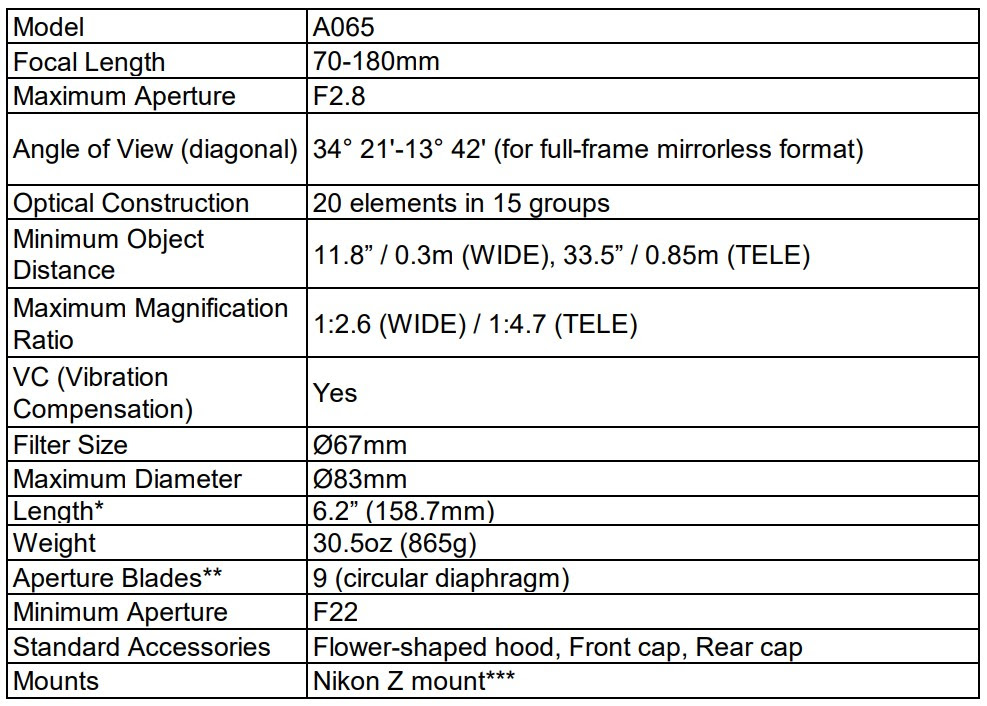
SPECIFICATIONS
TAMRON Announces the Class-Leading Compact and Lightweight Telephoto Zoom 70-180mm F/2.8 Di III VC VXD G2
* Length is the distance from the front end of the lens to the lens mount face.** The circular diaphragm stays almost perfectly circular up to two stops down from maximum aperture.***Previously released for Sony E-mount.Specifications, appearance, functionality, etc. are subject to change without prior notice.This product is developed, manufactured, and sold under the license agreement with Nikon Corporation.

Because we’re over here in Australia, we found this video from Photography With Antonio, Via Tamron Australia… Pleasantly Surprised – Lovely! Well worth checking it out if you get the chance.

The post TAMRON Announces the Class-Leading Compact and Lightweight Telephoto Zoom 70-180mm F/2.8 Di III VC VXD G2 appeared first on Digital Photography School. It was authored by Sime.